
Eggs in One Basket

Don’t buy this product!
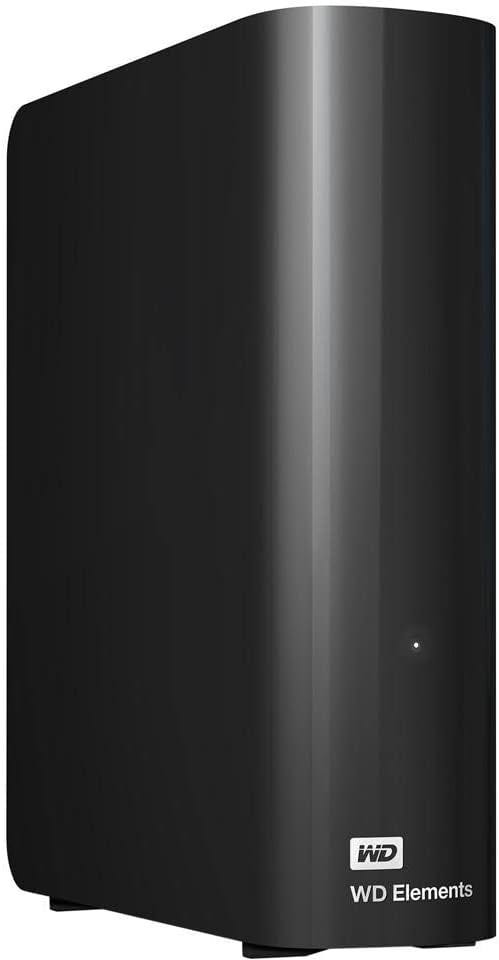
My Western Digital 20 Terabyte Elements external drive has failed. This is the first drive failure of my computing career, so I guess I was overdue. I was using it as an external hard drive for my Mac Studio, on which I had consolidated all the stuff I had backed up onto a variety of smaller devices. 1, 2, and 4 TB SD Drives, 5 and 6 TB Elements and Seagate externals. Put all my eggs into one basket and wasted the afternoon today on support chats.
This was the first time in decades I actually bought something with a case around a disk that typically goes inside a computer. Usually these have a power supply and a bit of a logic board that sits between the external plugs and the drive. It’s POSSIBLE that this is where the failure is located. That would mean that connecting the drive directly to internal cables in a PC MIGHT make it work well enough for me to get the data off it. However, there’s the cost to consider.
I believe most of the data that I had on other backup drives and transferred to this big drive in late April to early May of 2026 is still on those older backups. I have dedicated backups for things like my course videos, where the most recent entries date to June 2026. The one thing I’m probably missing are backups of the transfers I did from camera memory cards between March 2026 and the present. I delete those from the SD cards after I transfer them, so they’re probably gone for good.
I also copied a ton of photos from iPhoto (or Apple photo or whatever it’s called now) to DaVinci Resolve, and deleted them from my iPhoto Library. I think those may be lost. That would be a shame. But I’m not sure it justifies the cost of trying to recover those photos or the ones of my last couple of months that I took with cameras other than my phone. The biggest loss will be the photos I just took of my trip to see Lucy and Sofie in New Hampshire and in Pittsburgh. Luckily, I was jumping back and forth between my camera and my phone, so I still have a lot of photos to remember the trip by.
The cost of data recovery is pretty high, it seems. $50 for a diagnostic that will tell me “yep, the drive is broken”. Then $200-$450 for “logical recovery” if the drive is still functional. If there are physical issues with the drive or the control circuitry, $450-$1,500 is typical.
That’s too rich for my blood, and even at those prices there are no guarantees. So I’m going to try the drive again in the morning, to see if a miracle will occur. Then I’m going to RMA it to WD (it’s outside the Amazon return window) and get an advance replacement. I don’t think I’m going to use the replacement (fool me once), but I will sell it online and return to using SDs and maybe hard drives that don’t come in external boxes — but from Seagate and SanDisk rather than WD (WD owned SanDisk for a while but spun them off in 2025).
Hi Dan,
I'm so sorry to hear that. Losing valuable data is a terrible experience. But I think there's still some hope.
I've learned a few things on r/DataHoarder, although I'm a novice compared to them. The high-capacity WD Elements is indeed a hard drive in an enclosure, it's 3.5". But so are, as far as I understand, the other external drives you have (WD and Seagate), though they're 2.5". Inside, they're simply mechanical hard drives with spinning platters. In many cases, it's possible, as you mentioned, to remove them and put them in a computer.
I'm not sure if by "SD Drives" you mean Solid State Drives (similar to HDDs, connected via USB) or SD Cards (the tiny cards used, for example, inside cameras). If it's the former, SSDs are simply the drives used inside modern computers—much faster, less prone to damage from shocks since they have no moving parts, but also more difficult to recover if they are damaged. There are several types, such as SATA or NVMe. When sold as external drives in an enclosure, it's usually not possible to remove them and use them internally.
But in the case of high-capacity WD Elements drives, like yours, it is possible to remove it. There are numerous YouTube videos on how to do it. It's easy. The good thing is that you don't need a PC to use it as an internal component, to "shuck" it, as they say. You just need another enclosure or an inexpensive docking station that connects via USB—just search for "Hard Drive Docking Station"; Fideco or Orico can be decent options. In that case, that would be a solution if the problem lies with the WD Elements' native enclosure—its power delivery, its Micro-B port, etc. If you want to recover the data, that would be one option. If it doesn't work, you'd certainly have to take it to a data recovery service, but as you said, it's expensive (although perhaps the data inside is more valuable—and if the HDD isn't seriously damaged, it might not be so expensive).
Something similar happened to me after a while with a 4TB WD Elements drive. The internal drive itself is actually in perfect condition according to the tests I've run, but its Micro-B port is loose. It's intermittent, and I can only connect it to my Mac with a certain amount of pressure and in a specific position. Unfortunately, that hard drive has the port soldered on—I can't easily remove the drive and put it in another enclosure or docking station. My only option is to have someone micro-solder the port and repair it, but I haven't done that yet.
Unfortunately, any drive—of any type—is prone to failure. HDDs also have a limited lifespan: several years, hopefully more than a decade. Although there are exceptions—it depends on usage, care, and luck. Seagate, Western Digital, and Toshiba are the major brands, and experts usually recommend any of them. I trust Toshiba more for low-capacity hard drives and WD—more than Seagate—for high-capacity drives, just like yours (it seems that, for the small-capacity 2.5" drives, only Seagate doesn't have the port soldered on, but I still have to check).
Interestingly, people still recommend mechanical hard drives for general storage, especially for "cold storage"—where the data will just sit, not in constant use. They're simply the cheapest per terabyte. Solid State Drives (like the Samsung T7 or T9, for example) are considerably more expensive, although much faster—they're for constant, work-related use. They're simply different technologies, with pros and cons. SD cards, on the other hand, are flash memory but similar to SSDs—as are pendrives—and I've read many times that they aren't the most reliable for storing information for long periods.
Possibly the most reliable is magnetic tape. Its price per terabyte is cheaper than mechanical hard drives. But the thing is, tape drives are expensive and require additional setup. They're slow, not plug and play, but can easily last for decades. It's my dream to have that kind of storage! In the meantime, the best we have are HDDs—the higher the capacity, the cheaper the price per terabyte (I wouldn't go against high-capacity hard drives, since, again, any drive is prone to failure). CDs, DVDs, and Blu-rays can also be good cold storage media.
I suppose you've seen the price increases lately, due to AI. It's a terrible, nightmarish reality. HDDs have gone up a lot. But it seems to me that SSDs and SD cards have gone up even more. It's simply something to consider when choosing our storage solutions. And in any case, backups are always essential. Like the 3-2-1 backup rule: three copies of your data, stored on two different types of media, with one copy kept off-site. For example, valuable information copied on two external hard drives, plus a copy on an SD card, and one of these should be kept away from home, just in case. The cloud, for example, is a different media, but like everything else, it's still vulnerable.
I'm sorry I can't help more, but I'm sure if you post your situation on r/DataHoarder, there will be people who know a lot and will be willing to give advice.
Anyway, I really hope you recover your data, Dan!
I hope everything else is okay.
Cheers,
Mikjail
If I were you, being in CA, I'd drive the thing over to WD Global Headquarters: San Jose, California, USA (5601 Great Oaks Parkway) or HDD Engineering & R&D Hubs: San Jose, Fremont, and Irvine (California
and yell, fix this thing!